For AWS
Your EC2 estate as a live map, with costs, waste and open ports
VizTopo reads your AWS account with a read-only IAM policy and draws every EC2 instance inside its region, VPC, availability zone and subnet on one live canvas. Each instance shows what it costs a month at AWS list prices. Unattached volumes, unused Elastic IPs, idle NAT gateways and stopped instances still paying for disks are flagged with what they cost, security groups open to the internet are found, and when one instance can't reach another, VizTopo shows which hop blocks it. Changes are limited to resources you tag, and nothing is ever terminated.
What VizTopo shows from your AWS account
- Regions, VPCs, availability zones and subnets as containers, with each EC2 instance inside its subnet.
- Instances with their state, type, IP addresses, security groups, volumes and CPU from CloudWatch, plus AWS's own status checks and scheduled events.
- What else costs money: Elastic IPs, NAT gateways, EBS volumes and snapshots, load balancers, VPC endpoints and S3 buckets.
- Every region you pick and every account you connect, next to your Proxmox clusters, in one search by name, IP, ID or tag.
What it costs, and what's wasted
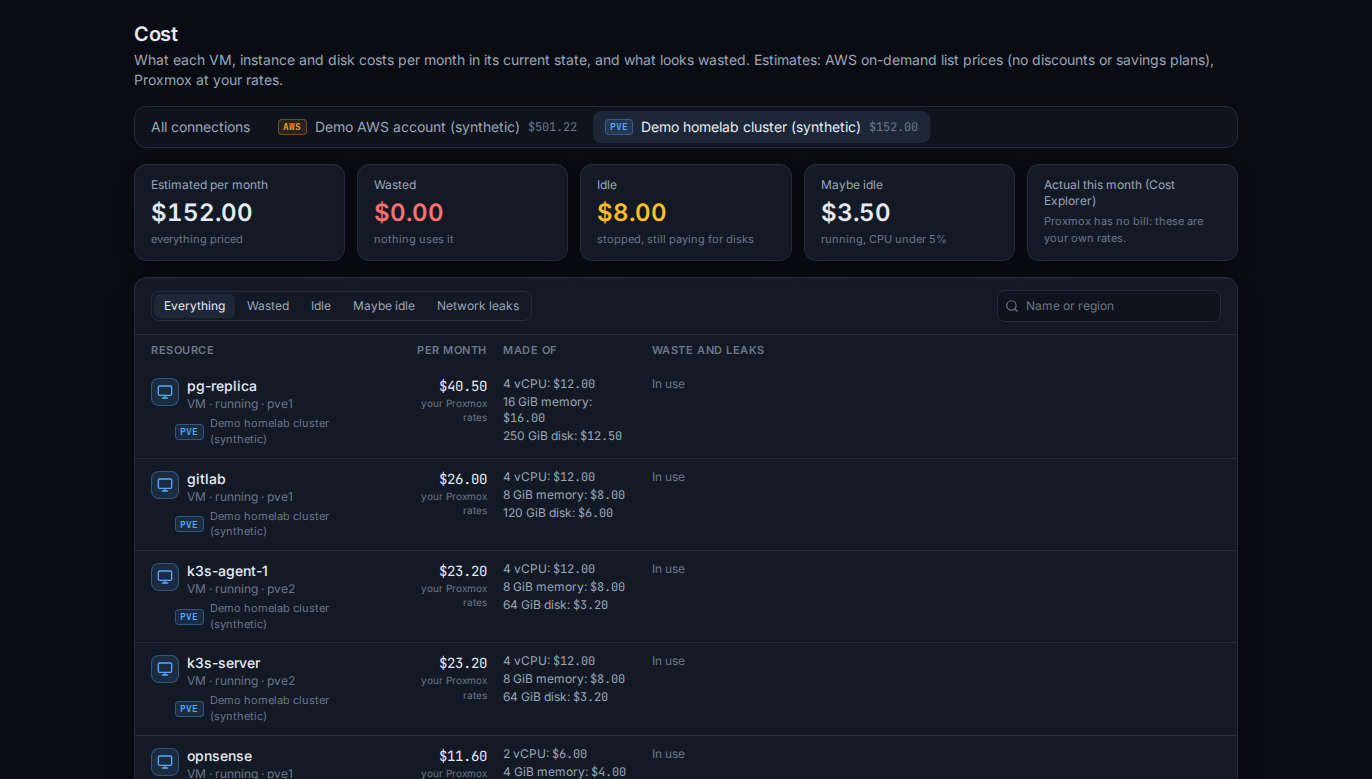
Instances, volumes, snapshots, NAT gateways, load balancers, VPC endpoints and S3 are priced from the AWS Price List at on-demand rates. Turn on Cost Explorer to compare with what AWS actually billed, by service.
- EBS volumes attached to nothing, still billed every month
- Elastic IPs nobody uses (every public IPv4 address is charged)
- Stopped instances that still pay for their disks
- Snapshots of volumes that no longer exist
- NAT gateways nothing uses
- Instances that have sat under 5% CPU for hours
Security findings
- Security groups open to the internet: all traffic; sensitive ports such as SSH, RDP, MySQL, PostgreSQL, SQL Server, Oracle, Redis, Elasticsearch, SMB, VNC or the Docker API; and other ports. Each says whether the instance has a public IP.
- IMDSv1 allowed: the instance metadata service answers requests without a session token.
- EBS volumes that aren't encrypted.
Why can't this instance reach that one?
Choose where the traffic comes from and the port, and VizTopo works out, hop by hop, whether your configuration lets it through: the instance's state, its public address, the subnet's route back, the network ACL both ways (it's stateless, so replies need their own rule) and the security groups. It names the hop that blocks, says it doesn't know where it hasn't read that part, and can't see inside the instance (an OS firewall, or whether anything listens).
Careful changes
- Start, stop and reboot instances
- Open or close a port on a security group
- Change an instance's security groups, or create a new group for it
AWS changes are fenced by a tag: the optional control policy only allows them on instances, security groups and VPCs tagged viztopo-control = true. Write mode is off for each connection until someone turns it on by typing its name; AWS dry-runs each change first, you confirm it, and it goes in the audit log. VizTopo has no way to terminate an instance or delete a volume, snapshot or network.
SSH without a key, and schedules
Open a terminal to an instance inside VizTopo without a key. Like the AWS console's EC2 Instance Connect, VizTopo uploads a one-time public key for the OS user, which the instance accepts for 60 seconds; nothing is stored. It needs ec2-instance-connect:SendSSHPublicKey (only on tagged instances), and the instance's SSH port has to accept VizTopo's server address.
Schedules start, stop and reboot instances on a timetable in your time zone, such as business hours on weekdays, or nights and weekends off. A stopped instance stops paying for compute; its disks are still billed.
What VizTopo needs from your AWS account
- A dedicated IAM user with the VizTopoReadOnly policy: EC2, VPC and EBS
Describecalls, CloudWatchGetMetricDataandpricing:GetProducts. Nothing in it can change anything. - Its access key, pasted once. It's stored encrypted on the server and never shown again. Root account keys fail VizTopo's connection test.
- Optionally:
ce:GetCostAndUsagefor Cost Explorer, the tag-fenced control policy for changes, andec2-instance-connect:SendSSHPublicKeyfor SSH without a key.
Every policy, in full: Connect AWS.
VizTopo and the AWS console
The AWS console is where you launch, configure and pay for everything. VizTopo is for seeing an account's EC2 estate at once, with what each part costs and what's wasted or exposed, and for a few common changes with checks, confirmations and a record.
| AWS console | VizTopo | |
|---|---|---|
| Launch and terminate instances; IAM, RDS, S3 and every other service | Yes | No |
| Instances drawn inside their VPCs and subnets | Lists, per service and region | One live map |
| Monthly cost on each instance | In Billing and Cost Explorer | On the card |
| Idle and orphaned resources flagged | In separate tools | On the map, with what each costs |
| Which hop blocks traffic to an instance | Reachability Analyzer | From the instance's card |
| Proxmox clusters next to AWS | No | Yes |
Questions
What IAM permissions does VizTopo need?
To read: EC2, VPC and EBS Describe calls, cloudwatch:GetMetricData and pricing:GetProducts, in a policy named VizTopoReadOnly (in full in the guide). Cost Explorer, changes and SSH without a key each take a few more actions, which you add only if you want them.
Can VizTopo terminate instances or delete volumes?
No. VizTopo has no action that terminates or deletes anything, and none of its policies allow it.
How accurate are the EC2 cost estimates?
They use AWS's on-demand list prices for what's running, so discounts, savings plans and data transfer aren't included. Turn on Cost Explorer to compare with what AWS actually billed, by service.
Can I choose which instances VizTopo may change?
Yes. The control policy only allows changes on resources tagged viztopo-control = true, write mode is off until you turn it on for the connection, and each action can be set to Allow, Ask every time or Deny.
Does it work with several regions and accounts?
Yes. Each connection is one AWS account and the regions you pick; add a connection for each account.
Updated