AWS and Proxmox, on one live map
See every box you run, what it costs, and what you're wasting.
VizTopo draws your Proxmox VMs and containers on their nodes and networks, and your EC2 instances inside their regions, VPCs and subnets, on one live canvas. It puts a monthly cost on each box, flags what's idle or exposed, shows which applications run where, and lets you fix it carefully: read-only until you say otherwise, and nothing is ever deleted.
Free for up to 10 boxes · No card · Every account comes with a demo of AWS and Proxmox to explore before you connect anything
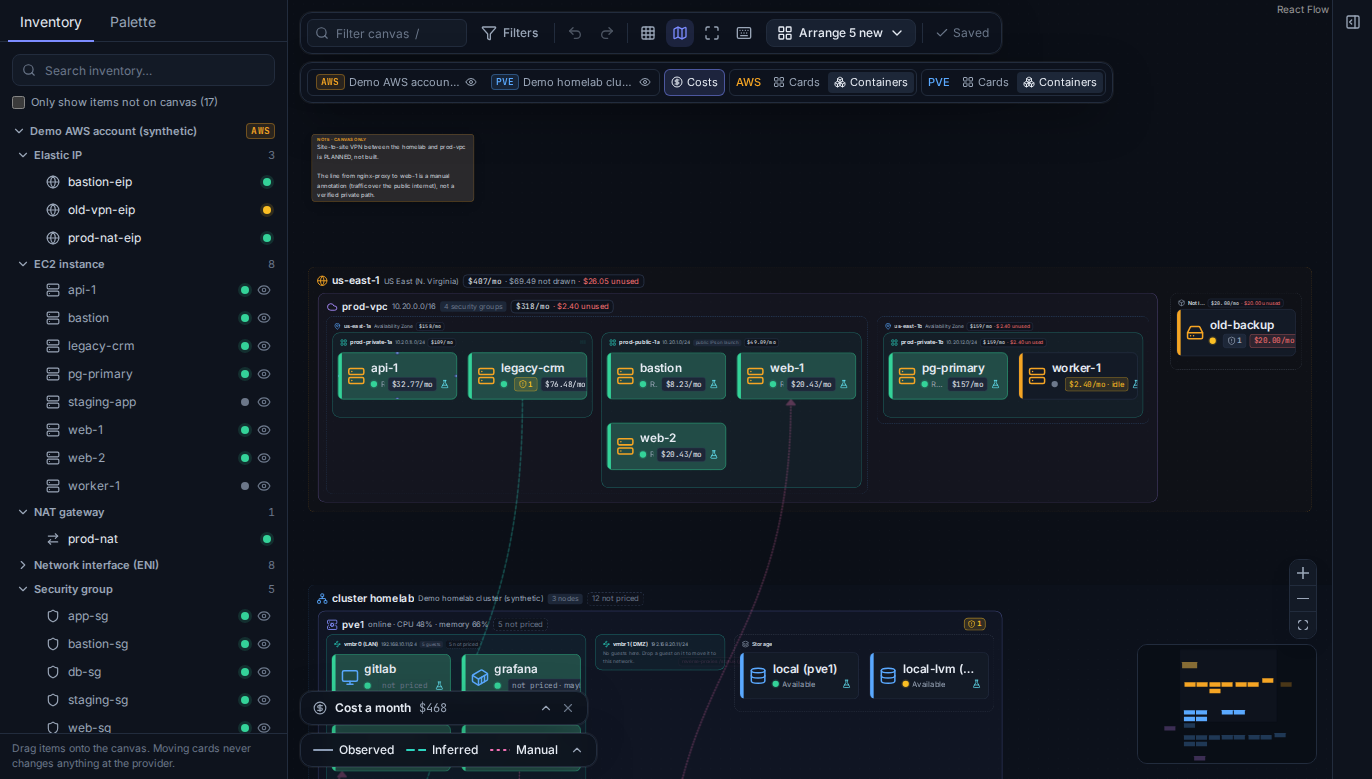
The canvas with costs on, using VizTopo's built-in demo data.
How much of what you run does nothing?
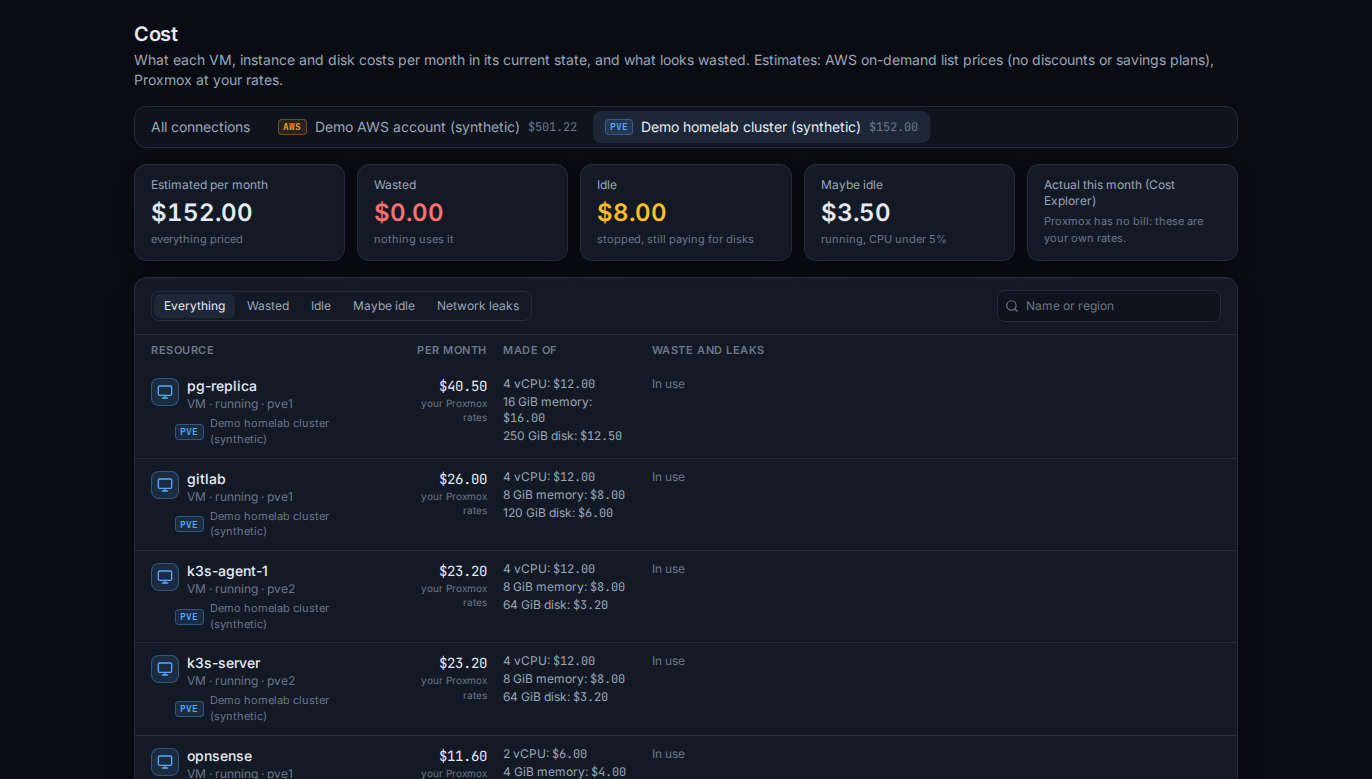
On AWS it's the bill. On Proxmox it's the hardware: cores, memory and disk held by VMs nobody uses. Most teams don't know until someone goes looking, node by node and region by region. VizTopo looks for you and puts a number on it.
of cloud infrastructure spend is wasted, by organisations' own estimate.
Source: Flexera State of the Cloud 2026say managing cloud cost is their top cloud challenge, ahead of security.
Source: Flexera State of the Cloud 2026of EC2 budgets still go on previous-generation instance types, on average.
Source: Datadog State of Cloud CostsWhat VizTopo finds on the free plan
- Stopped Proxmox VMs and containers still holding their disks
- VMs, containers and instances that have sat at under 5% CPU for hours
- AWS disks attached to nothing, still billed every month
- Elastic IPs nobody uses (every public IPv4 address is charged)
- Stopped EC2 instances that still pay for their disks
- Snapshots of volumes that no longer exist, NAT gateways nothing uses
Proxmox boxes are priced at your own rates per vCPU and per GiB of memory and disk. AWS uses its own on-demand list prices, and Cost Explorer's actual spend by service when you turn it on.
Your applications, not just your boxes
Map what your business runs, such as a shop with its load balancer, web servers, API, workers, database and queue, onto the VMs, containers and instances it runs on. VizTopo shows where each part runs, whether it's up, what the whole application costs a month, and whether the network actually lets its parts reach each other.
- Each part linked to its real boxes, so you can see where the web servers are (web-1 and web-2 in us-east-1a), and that one worker is stopped
- Healthy, Degraded or Down at a glance, and what the application costs a month
- Check connections: on AWS, every flow is checked against the security groups, network ACLs and routes between its boxes. A blocked one names the rule in the way and the fix
- Or let VizTopo find them: on a box with several apps, it signs in over SSH, reads the web server's sites and the services behind each port, and proposes an application per site
- Start from a template: a web app with a database, an e-commerce store, microservices behind a gateway, a static site with an API, or self-hosted services behind a reverse proxy
- Mapping changes nothing at AWS or Proxmox. A box's details list the applications it's part of
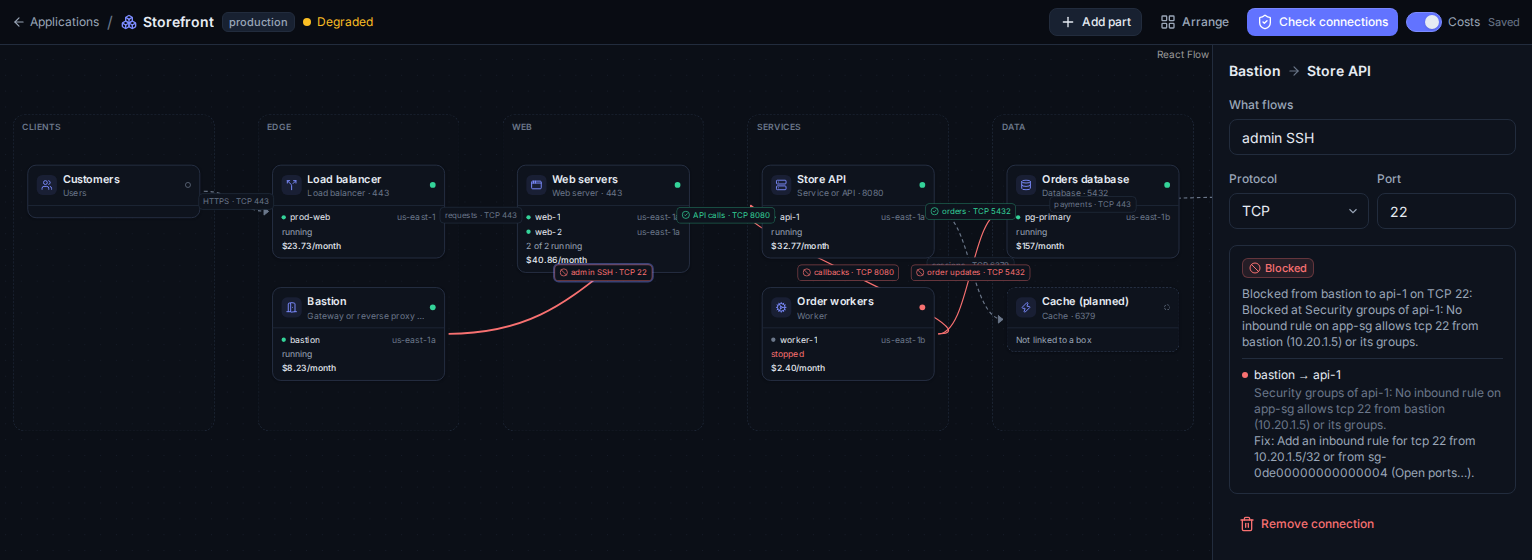
The demo's storefront with costs on: each part on its boxes, flows the network allows in green, blocked ones in red, and the fix for the one selected.
One screen instead of ten consoles
AWS and Proxmox on one canvas
Cluster, node, bridge and storage around your Proxmox VMs and containers; region, VPC, zone and subnet around your EC2 instances. Every cluster, account and region you connect, live, in one place.
Cost and waste on the map
Each card and container shows what it costs a month. Stopped VMs holding disk, quiet boxes, unattached AWS disks and idle IPs are flagged with the money they waste.
Security findings where they live
A Proxmox datacenter firewall that's off, a public VM nothing filters, SSH or databases open to the internet, IMDSv1, unencrypted disks: flagged on the card, with the fix. When an AWS instance can't reach another, VizTopo shows which rule blocks it.
Careful changes from the map
Start and stop VMs and instances, move a VM to another bridge or another node, clone it, copy an EC2 instance to another region, open or close a port, change security groups. Each change is checked and confirmed first.
Schedules that cut the bill
Start, turn off and reboot VMs and EC2 instances on a timetable in your time zone: business hours on weekdays, nights and weekends off, a weekly reboot window, or a multi-tier app started in order. Each run goes through the same checks as a click.
Permissions you can read
See exactly what VizTopo may do on each connection, checked live, with the exact grant for anything missing. Set each action to Allow, Ask every time or Deny.
Find it and connect
Search every box by name, IP, node or tag. Open a terminal or a VM's screen right inside VizTopo, with copy and paste both ways. SSH into EC2 instances without a key, copy the exact SSH command, or open the Proxmox or AWS console at that box.
Your whole team
Invite people by email and give each a role: Admin, Member, or roles you make with the permissions you choose. Everyone sees the same live map; roles decide who may change what.
On your phone, too
Every page fits a phone: a menu instead of the side rail, tables that scroll, and a canvas you can pan and zoom, with each box's details a tap away.
Built to be trusted with production
Connecting a tool to your cluster or your cloud is a big step. VizTopo is designed so that the worst it can do is less than what you allow, and everything it does is on the record.
How VizTopo handles credentials and changes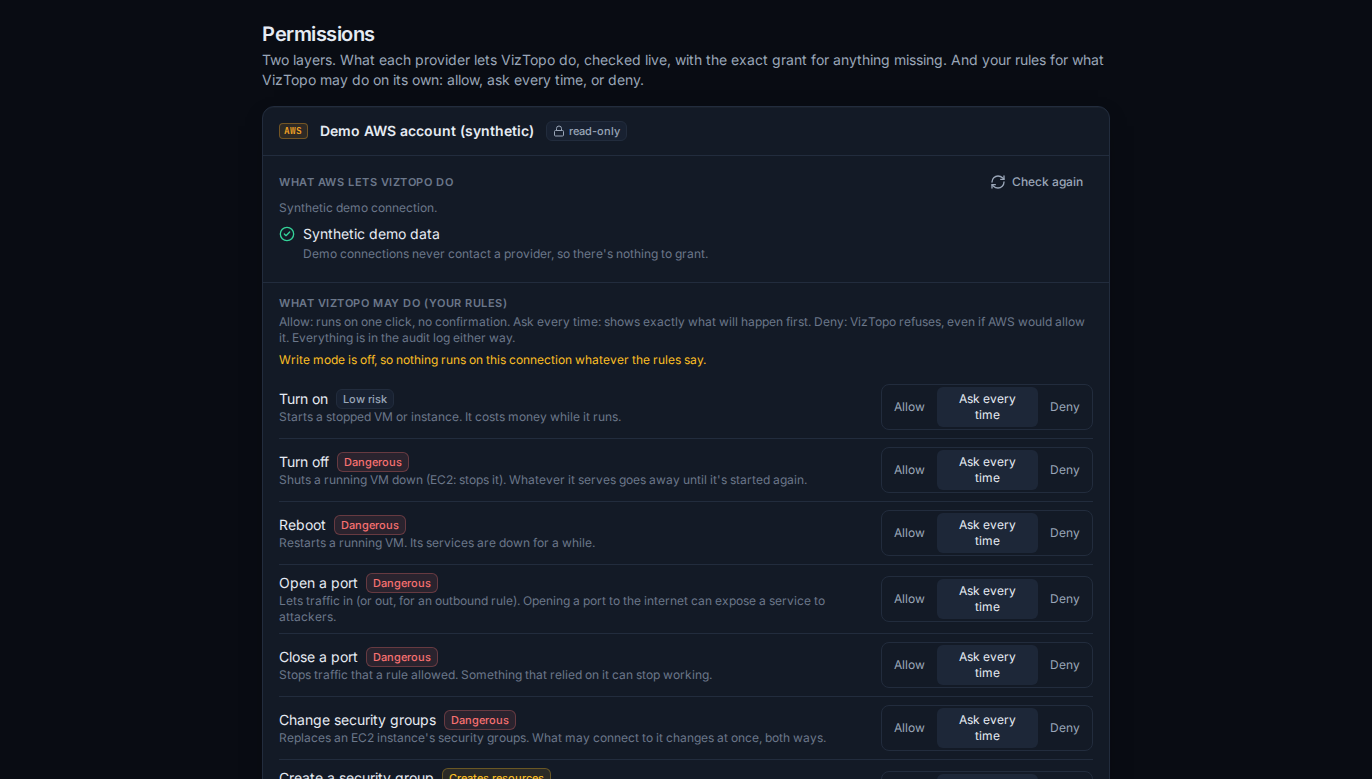
- Read-only until you turn on write mode
Each connection starts read-only. Control actions only exist after someone allowed to use Control mode switches on write mode for that connection, by typing its name.
- Never deletes or terminates your resources
VizTopo has no way to delete or terminate a VM, instance, disk, snapshot or network. The only thing it ever removes is a port rule you chose to close, after you confirm it.
- Every change is checked, then confirmed
Before anything runs, VizTopo checks that Proxmox or AWS allows it (with a dry run on AWS), shows exactly what will change, and waits for your confirmation.
- Everything is in the audit log
Who did what, when, to which resource, and how it ended. Write-mode switches and changes to VizTopo's own rules too.
- Credentials are encrypted and never leave the server
Keys and tokens are stored encrypted with AES-256-GCM, are never sent to your browser, and never appear in logs. TLS verification is never switched off.
- Least privilege, written out for you
VizTopo gives you the exact read-only Proxmox role or IAM policy to create before you connect, and shows what's granted on its Permissions page.
Pricing
A box is a VM, a container or an EC2 instance. Networks, disks, IPs and everything else are free. More about plans
Free
For a homelab or a first look at your cloud.
- Up to 10 boxes (VMs, containers, EC2 instances)
- AWS and Proxmox on one live canvas
- Cost and waste estimates, security findings
- Power, network, port and security group changes, checked and confirmed
- Permissions page, Allow / Ask / Deny rules, audit log
Team
Most teamsFor a small team running real workloads.
- Up to 100 boxes
- Up to 5 people, with roles you set
- Everything in Free
- Email support
Paid by card through Square. Cancel anytime; it runs to the end of the paid period.
Business
For many accounts, clusters and people.
- Unlimited boxes
- Unlimited people, with roles you set
- Everything in Team
- Priority support
Paid by card through Square. Cancel anytime; it runs to the end of the paid period.
Questions
What does VizTopo need from my Proxmox?
An https address viztopo.com can reach from the internet (let only viztopo.com's server through your firewall: its address is shown when you add the connection), and an API token with the built-in PVEAuditor role for reading. Control actions need a few more privileges, which VizTopo lists exactly, and only if you want them.
What does VizTopo need from my AWS account?
Read-only access to describe your EC2 estate and read prices: VizTopo shows you the exact IAM policy before you connect. Control actions need extra permissions, which you add only if you want them, and can fence with a tag.
What happens when I go over 10 boxes on Free?
The 10 boxes VizTopo found first stay fully usable. The rest show blurred, and can't be controlled, until you upgrade or have 10 boxes again.
Can VizTopo show which boxes make up an application?
Yes. On the Apps page you map an application's parts (load balancer, web servers, API, database, queue, and outside services such as payments) onto the boxes they run on, or start from a template. VizTopo shows where each part runs, whether it's up and what the application costs. On AWS it also checks every connection against the security groups, network ACLs and routes, and names the rule that blocks one.
Can VizTopo turn dev and lab boxes off at night?
Yes. A schedule starts, turns off or reboots the VMs and instances you pick at set times in your time zone, such as on for business hours on weekdays, or off all weekend. It acts like a person would: write mode has to be on, VizTopo's rules for that connection still apply, and every run is in the audit log. A stopped EC2 instance stops paying for compute; its disks are still billed.
Can VizTopo delete my resources?
No. VizTopo can't delete or terminate a VM, instance, disk, snapshot or network. Anything it creates for you (a clone, a security group, an instance copied to another region and its images) stays until you remove it yourself.
Can VizTopo move a box to another region or node?
On Proxmox, yes: drag a VM or container onto another node of its cluster, and Proxmox's own migration moves it (live, for a running VM). AWS can't move an instance between regions, so VizTopo copies it: it makes an image, copies it to the region you pick and starts a new instance there, with the subnet and security groups you choose. The original is never terminated; you can have it stopped. Moving between Proxmox and AWS isn't supported yet.
How accurate are the cost estimates?
Proxmox has no prices, so VizTopo uses the rates you set per vCPU and per GiB of memory and disk: as accurate as your rates. On AWS they use on-demand list prices for what's running, so discounts, savings plans and data transfer aren't included; turn on Cost Explorer to compare with what AWS actually billed, by service.
Can my team use it together?
Yes. Invite people by email and give each a role: Admin, Member (sees everything, changes nothing) or roles you make with the permissions you choose. Team allows 5 people, Business has no limit, and there's always exactly one owner.
Can I take my work with me?
Yes, on Team and Business. Export a workspace's own work as a file: canvases with their notes and planned blocks, applications, schedules, roles and who has which, and your Allow, Ask or Deny rules. Import it into another workspace after a preview of what it adds, and choose whether its people and roles update yours. The inventory (with what each box costs) and the audit log export as CSV. Credentials, passwords and billing are never in the file.
What happens to my data if I cancel?
Your plan runs to the end of what you paid for. After that, VizTopo stops syncing and controlling anything, but your workspace stays there to look at, for as long as you choose when you cancel: 30 days at no charge and then it's deleted, or deleted 7 days after the plan ends. Reactivate with a plan before then and everything carries on where it was.